Adding Edge and Texture with Bones Photoshop Stamp Brushes
Creative projects often hit a wall when you are trying to convey a specific mood without spending hours drawing every detail by hand. Whether you are designing a poster for a local band, creating social media graphics for a Halloween promotion, or working on a gritty editorial layout, the need for high-quality, thematic elements is constant. This is where specialized tools like Bones Photoshop Stamp Brushes become invaluable. Instead of searching through endless stock photo sites for isolated images that never quite fit your color palette or resolution needs, these brushes allow you to paint texture and imagery directly onto your canvas with precision and speed.
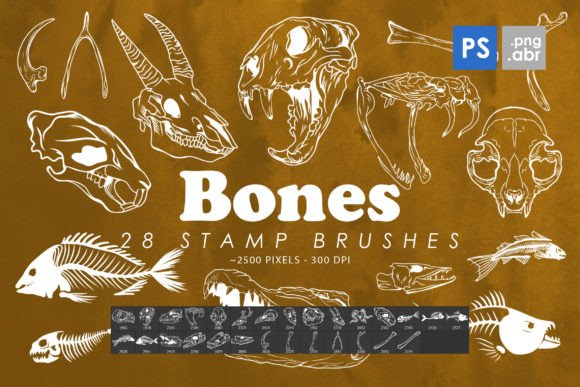
The pack includes 28 high-resolution stamp brushes, ranging from 2000 to 2500 pixels in size. This level of detail ensures that even when scaled down for web use or printed on large formats, the edges remain crisp and the textures retain their integrity. Beyond just the brush files, the inclusion of 28 isolated PNG images offers flexibility for users who prefer drag-and-drop workflows over traditional brushing techniques. This dual-format approach makes the resource accessible to both seasoned digital artists and beginners who are just starting to explore Adobe Photoshop CS6 through CC.
Why Designers Choose Stamp Brushes Over Standard Clipart
Many creators hesitate to use clipart because it often feels static or disconnected from the rest of the design. When you drop a standard image into a composition, it sits on top of the background rather than interacting with it. Bones Photoshop Stamp Brushes solve this problem by allowing you to control opacity, flow, and blending modes in real-time. You can lower the opacity to create a subtle watermark effect behind text, or use a multiply blend mode to make the bone structures look like they are embedded into a textured paper background.
This interactivity is crucial for professional-looking results. For instance, if you are designing a vintage-style apothecary label, you might want the bone illustrations to appear faded and worn. With a stamp brush, you can vary the pressure sensitivity of your tablet to create natural variations in density, mimicking the look of an old woodblock print. This level of organic variation is nearly impossible to achieve with static PNGs unless you spend significant time editing each individual file.
Real-World Applications Across Industries
The versatility of this brush set extends far beyond typical horror or Halloween themes. While the subject matter is macabre, the aesthetic utility is broad. Here is how different professionals and hobbyists can integrate these tools into their daily workflows.
Marketing and Social Media Campaigns
Marketers often need to grab attention quickly in crowded feeds. A fitness brand promoting a "skeleton crew" workout challenge or a nutritionist discussing bone health can use these illustrations to create engaging, on-brand visuals. The high resolution allows for clear details that stand out on mobile screens. By using the brushes as decorative elements around bold typography, you can create eye-catching stories or posts that feel custom-made rather than templated.
Print Design and Editorial Layouts
For magazine editors or book cover designers, texture is everything. These brushes work exceptionally well for creating borders, dividers, or background patterns. Imagine a mystery novel cover where faint skeletal structures weave through the fog behind the title. The 2500-pixel size ensures that when printed at 300 DPI, the images remain sharp. You can also use the isolated PNGs for physical products like greeting cards or posters, where layering multiple bone elements can create a complex, collage-like aesthetic without requiring advanced illustration skills.
Tattoo Art and Concept Development
Tattoo artists frequently use digital tools to draft concepts before ink touches skin. These brushes serve as an excellent base for tattoo designs. An artist can quickly stamp various bone structures onto a digital mockup of a limb to experiment with placement and flow. Because the brushes are high quality, they provide a solid foundation that can be further customized with shading and line work. This speeds up the consultation process, allowing clients to visualize potential designs more accurately.
Educational and Scientific Illustrations
While not anatomically perfect medical diagrams, these brushes can be useful for educational materials that require a stylized approach. Teachers creating engaging biology presentations or bloggers writing about anatomy can use these elements to break up text and add visual interest. The key is to use them as illustrative aids rather than strict scientific references, adding a creative flair to otherwise dry content.
Technical Considerations for Best Results
Before downloading and installing Bones Photoshop Stamp Brushes, it is important to understand how to get the most out of them. These brushes are compatible with Photoshop CS6 through the latest Creative Cloud versions. If you are using older software, ensure your version supports ABR files. The large pixel dimensions (2000–2500) mean the files are substantial, so having adequate storage and processing power will help maintain smooth performance while painting.
When using stamp brushes, always pay attention to your brush settings. Adjusting the spacing parameter can prevent overlapping stamps from looking cluttered, while tweaking the angle jitter can add randomness if you are scattering bones across a background. For those who prefer not to use the brush engine, the included PNG files are transparent and ready for immediate use in other design software like Illustrator, Canva, or Procreate. This cross-platform compatibility makes the pack a smart investment for creatives who work across multiple applications.
Enhancing Your Creative Arsenal
Building a library of reliable resources is essential for efficient workflow. Having a go-to set of thematic brushes saves time during tight deadlines. Instead of hunting for assets mid-project, you have a trusted tool ready to deploy. The Bones Photoshop Stamp Brushes offer a unique combination of quality and convenience. They are not just decorative; they are functional tools that can elevate the production value of your work.
Whether you are a small business owner creating seasonal promotions, a freelancer designing album art, or a hobbyist making digital scrapbooks, these brushes provide the raw material needed to bring your vision to life. The ability to switch between brush strokes and static images gives you the freedom to choose the method that best suits your current task. By integrating these elements thoughtfully, you can create designs that are not only visually striking but also technically proficient.
Ultimately, the value of any digital asset lies in how well it solves a problem. In this case, the problem is the time-consuming nature of creating detailed, thematic illustrations from scratch. Bones Photoshop Stamp Brushes offer a practical solution that balances artistic control with efficiency. As you experiment with blending modes, opacity levels, and composition techniques, you will find new ways to incorporate these elements into your unique style. The result is a portfolio that stands out for its attention to detail and creative depth.