Mastering Industrial Aesthetics with Gears Photoshop Stamp Brushes
In the ever-evolving landscape of digital design, the ability to quickly integrate complex mechanical elements into your artwork can be a game-changer. Whether you are crafting a steampunk-inspired poster, designing a rugged logo for an engineering firm, or adding subtle industrial texture to a web banner, the right tools make all the difference. This is where Gears Photoshop Stamp Brushes come into play, offering a streamlined solution for creators who value both efficiency and high-quality visual output.
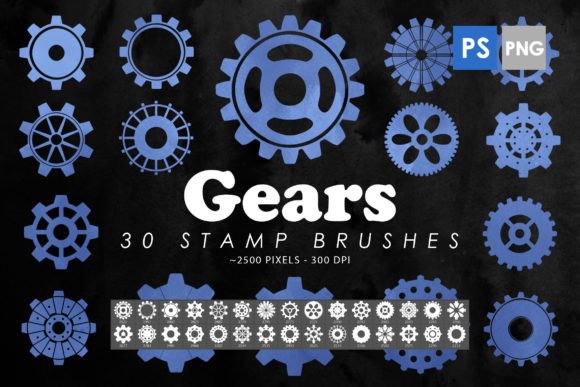
For many designers, the process of drawing intricate gear mechanisms from scratch is not only time-consuming but also technically demanding. Achieving the correct perspective, tooth alignment, and metallic shading requires a level of precision that can slow down even the most experienced artists. By utilizing a specialized brush pack, you bypass these hurdles, allowing you to focus on composition and creativity rather than tedious vector plotting. The collection known as 30 Gears Photoshop Brushes serves as an essential component of a modern creative arsenal, bridging the gap between conceptual ideas and polished final products.
The Versatility of Mechanical Design Elements
When we talk about gears, we often think strictly of machinery. However, in graphic design, these shapes represent much more. They symbolize progress, interconnectedness, precision, and industry. The Gears Photoshop Stamp Brushes are designed to be versatile enough to transcend literal interpretations. You might use them as decorative borders for a wedding invitation with an industrial theme, or perhaps as a subtle background pattern for a tech startup’s website.
The utility of this specific pack lies in its dual-format delivery. It includes not only the standard Photoshop ABR files but also 30 isolated PNG images. This distinction is crucial for users who may not have access to the latest software versions or who prefer working in different design applications like Procreate, Affinity Photo, or even word processors for simple layouts. The PNGs act as ready-made clipart, while the brushes allow for dynamic, scalable application directly within the Photoshop environment.
Who Benefits from High-Quality Gear Assets?
The audience for these tools is surprisingly broad. While professional graphic designers are the obvious beneficiaries, several other groups find immense value in having pre-made, high-resolution mechanical assets:
- Tattoo Artists: Creating a base for biomechanical tattoos requires precise geometric shapes. These brushes provide a solid foundation that can be customized and distorted to fit the contours of the human body.
- Print-on-Demand Sellers: Entrepreneurs selling t-shirts, mugs, or posters often need unique designs that stand out. Using gear elements can help create niche products targeting engineers, mechanics, or fans of the steampunk genre.
- Educators and Presenters: Teachers explaining mechanical physics or business leaders illustrating concepts of "working parts" in a strategy can use these visuals to make abstract ideas concrete and engaging.
- Hobbyists and Digital Collage Artists: For those who enjoy creating digital scrapbooks or surreal art compositions, having a library of isolated mechanical parts allows for endless experimentation without the need for advanced drawing skills.
Technical Specifications and Quality Expectations
One of the primary concerns when downloading free or paid digital assets is resolution. Low-quality brushes can appear pixelated when scaled up, ruining the professionalism of a print project. The Gears Photoshop Stamp Brushes in this pack address this concern by offering a substantial size range. Each brush stamp is rendered at approximately 2000 to 2500 pixels. This resolution ensures that even when printed on large formats like posters or banners, the edges remain crisp and the details stay sharp.
Compatibility is another critical factor. The pack is designed to work seamlessly with Photoshop CS6 through the latest Creative Cloud (CC) versions. This backward compatibility is vital for professionals who may still rely on older, stable versions of the software for specific workflows. Furthermore, the inclusion of isolated PNGs means that if you encounter any compatibility issues with the ABR file, you have an immediate fallback option that works in virtually any image editing software.
Practical Applications in Real-World Scenarios
To truly understand the value of these brushes, let’s look at how they can be applied in specific projects. Imagine you are designing a cover for a science fiction novel. The theme involves time travel and complex machinery. Instead of spending hours rendering a single clockwork mechanism, you can use the Gears Photoshop Stamp Brushes to layer multiple gear sizes. By adjusting the opacity, blending modes, and rotation of each stamp, you can create a sense of depth and motion. You might set one layer to "Overlay" to blend the gears into a textured background, while keeping another layer at 100% opacity to serve as the focal point.
Another scenario involves web design. A logistics company wants to convey reliability and systematic efficiency on their homepage. Using the gear elements as subtle icons next to service descriptions can reinforce this message visually. Because the PNGs are isolated, they can be easily colored to match the brand’s palette without the hassle of removing backgrounds. This saves significant time during the web development phase, allowing for quicker iterations and faster project turnaround.
Evaluating Suitability for Your Projects
Before integrating any new asset into your workflow, it is wise to evaluate whether it fits your specific needs. While Gears Photoshop Stamp Brushes are incredibly useful, they are not a one-size-fits-all solution for every design challenge. Here are some considerations to keep in mind:
- Style Consistency: These brushes feature a realistic, detailed style. If your project requires flat, minimalist vector graphics, these detailed stamps might clash with your overall aesthetic unless heavily stylized or simplified.
- Customization Needs: While the brushes offer variety, they are pre-defined shapes. If you need a gear with a very specific number of teeth or a non-standard ratio, you may still need to create custom vectors. However, these brushes serve as an excellent starting point or placeholder.
- Layer Management: Using multiple stamp brushes can quickly clutter your layers panel. It is good practice to group related gear elements or merge them once you are satisfied with their placement to keep your file organized.
Enhancing Your Creative Workflow
The true power of Gears Photoshop Stamp Brushes lies in how they enhance your workflow rather than just providing static images. By reducing the time spent on repetitive drawing tasks, you free up mental energy for higher-level creative decisions. You can experiment with different compositions, try out various color schemes, and explore new artistic directions without the fear of wasting hours on detailed illustration work.
Moreover, these tools encourage experimentation. When the barrier to entry for creating complex imagery is lowered, designers are more likely to take risks. You might discover that combining gear elements with organic textures creates a striking contrast that becomes your signature style. Or, you might find that using the gears as masks for photos adds an intriguing industrial frame to your portrait photography.
Final Thoughts on Digital Asset Integration
In conclusion, the 30 Gears Photoshop Brushes pack represents a valuable resource for anyone looking to add mechanical precision and industrial flair to their digital projects. With high-resolution outputs, broad software compatibility, and versatile usage options ranging from print to web, it addresses the practical needs of modern creators. Whether you are a seasoned professional looking to speed up your workflow or a beginner eager to create stunning designs without extensive drawing skills, these brushes offer a reliable and efficient solution.
Remember, the best tools are those that disappear into the background, allowing your creativity to shine. By incorporating Gears Photoshop Stamp Brushes into your library, you ensure that when inspiration strikes, you have the means to execute your vision quickly and effectively. As you explore the possibilities, consider how these elements can be transformed, layered, and reimagined to suit your unique artistic voice. The gears are turning; it is time to let your creativity drive the machine.