Crystals Photoshop Stamp Brushes
Visual texture is often the missing ingredient in digital designs that feel flat or sterile. Whether you are composing a social media graphic, designing a book cover, or refining a photo manipulation project, adding organic, high-resolution details can elevate the final output from amateur to professional. This is where specialized tools like Crystals Photoshop Stamp Brushes become invaluable. Rather than spending hours searching for stock photos of minerals and gemstones, only to struggle with complex masking and blending, these brushes offer an immediate, high-quality solution for integrating crystalline structures into your workflow.
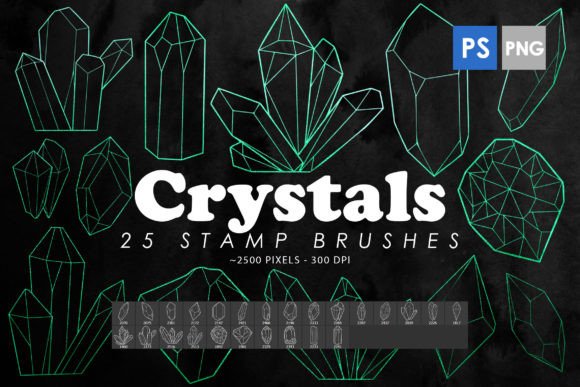
The core value of this resource lies in its versatility and resolution. The pack includes 25 distinct Photoshop stamp brushes, each rendered at a substantial size of 2000 to 2500 pixels. This high pixel count ensures that even when scaled up for large-format prints or high-density displays, the edges remain crisp and the internal details of the crystals retain their clarity. For designers working across various mediums—from web banners to physical posters—this level of detail is non-negotiable. Blurry or pixelated assets can undermine the credibility of a design, but these brushes maintain integrity regardless of the canvas size.
Streamlining the Creative Workflow
Time is a critical resource for freelancers, agency designers, and content creators. A common bottleneck in digital art is the asset gathering phase. Finding a specific type of quartz or amethyst that matches the lighting and angle of your composition can take significant time. With Crystals Photoshop Stamp Brushes, the asset is ready to use instantly. You simply select the brush, click on the canvas, and the crystal appears. This efficiency allows you to focus more on composition, color grading, and overall aesthetic rather than technical hunting.
Beyond the standard ABR file format, which is compatible with Photoshop CS6 through CC, the inclusion of 25 isolated PNG images adds another layer of flexibility. Not every creator works exclusively within Photoshop, nor does every project require a live brush tool. Having standalone PNGs means you can drag and drop these crystal elements into other software such as Illustrator, Canva, Procreate, or Affinity Photo. This cross-platform compatibility makes the pack a versatile addition to any creative arsenal, ensuring that you are not locked into a single application to utilize the assets effectively.
Practical Applications Across Industries
The utility of these brushes extends far beyond simple decoration. Different professionals can leverage these crystalline elements to solve specific visual problems or enhance communication.
- Brand Identity and Packaging: For brands associated with luxury, wellness, or natural products, crystal imagery conveys purity, value, and structure. Using these brushes on product mockups or packaging designs can add a tactile sense of quality without the cost of a custom photoshoot.
- Digital Marketing and Social Media: In a crowded feed, eye-catching textures stop the scroll. Overlaying subtle crystal fragments on promotional graphics can create depth and interest, making static posts more engaging. They work particularly well for topics related to mindfulness, astrology, or high-end tech.
- Print Design and Editorial: Magazine layouts and book covers often require unique decorative elements. These high-resolution stamps can serve as chapter headers, background textures, or focal points that guide the reader’s eye through the page layout.
- Tattoo Art and Concept Art: Tattoo artists often need clean, high-contrast references for geometric or nature-based designs. The isolated PNGs provide clear bases that can be traced or modified, while concept artists can use them to quickly block out magical or sci-fi environments involving mineral formations.
Enhancing Visual Depth and Composition
One of the most effective ways to use Crystals Photoshop Stamp Brushes is to create depth through layering. By placing larger, more opaque crystals in the foreground and smaller, semi-transparent ones in the background, you can simulate a three-dimensional space. Adjusting the blending modes—such as using "Screen" for light-colored crystals against dark backgrounds or "Multiply" for darker stones on light surfaces—allows for seamless integration into existing photographs.
This technique is particularly useful for photo manipulators who want to add surreal or fantasy elements to realistic portraits. For instance, adding a cluster of sharp, geometric crystals emerging from a subject’s clothing or surroundings can create a striking narrative element. Because the brushes are high-quality, they respond well to further editing. You can adjust hue and saturation to match the color palette of your image, apply blur filters for depth of field effects, or use layer masks to hide parts of the crystal behind other objects, creating a believable interaction between the new element and the original photo.
Considerations for Optimal Use
While these brushes are powerful, they are tools that require thoughtful application. Overusing decorative elements can clutter a design and distract from the main message. It is essential to consider the balance between the crystal textures and the primary content. In minimalist designs, a single, well-placed crystal fragment may have more impact than a scattered array. Additionally, lighting consistency is key. If your source image has a strong light source from the left, ensure that the highlights and shadows on the crystal stamps align with that direction. This may require rotating the brush tip or flipping the PNG horizontally to match the scene’s physics.
Another consideration is the style of the crystals. This pack offers a specific aesthetic—likely sharp, geometric, or naturally fractured forms. If your project requires soft, rounded, or organic shapes, these might not be the perfect fit. Always preview the included PNGs to ensure the visual style aligns with your brand guidelines or artistic vision. However, for projects requiring structure, clarity, and a touch of elegance, these brushes are exceptionally well-suited.
Investing in Versatile Creative Assets
For small business owners and entrepreneurs who manage their own marketing, having a library of high-quality, reusable assets is a smart investment. Instead of purchasing individual stock images for each campaign, a comprehensive brush pack like this provides a recurring resource. You can use the same crystal elements across different platforms, maintaining visual consistency in your branding. The ability to recolor and resize them means they can adapt to seasonal campaigns or shifting design trends without losing relevance.
Educators and bloggers can also benefit from these visuals. When explaining concepts related to geology, energy, or structure, having clear, attractive illustrations can improve comprehension and retention. The isolated PNGs are particularly useful here, as they can be easily inserted into presentation slides or blog posts without complex editing.
In conclusion, Crystals Photoshop Stamp Brushes offer more than just decorative flair; they provide a practical, time-saving solution for enhancing digital designs. By combining high-resolution details with flexible file formats, this pack supports a wide range of creative goals. Whether you are looking to add subtle texture to a corporate brochure or create a bold, fantastical piece of digital art, these tools empower you to achieve professional results efficiently. Integrating such specialized resources into your workflow allows you to focus on what matters most: telling your story through compelling visual design.