Evaluating the Utility of Stars Photoshop Stamp Brushes for Modern Design Workflows
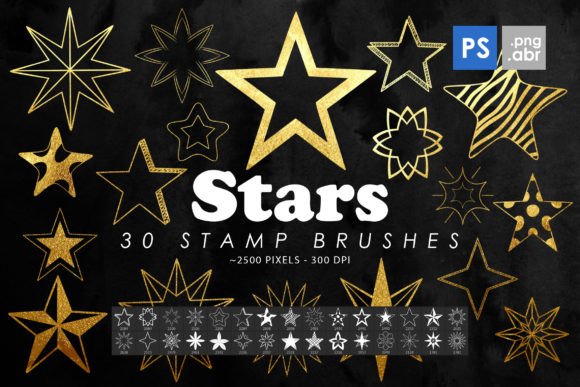
In the expansive ecosystem of digital design assets, efficiency often dictates the quality of output. For graphic designers, illustrators, and content creators, the ability to rapidly integrate high-quality decorative elements without compromising resolution or aesthetic integrity is paramount. This is where specialized toolsets like Stars Photoshop Stamp Brushes enter the conversation. Rather than relying on generic, low-resolution clipart or spending hours manually drawing celestial motifs, professionals can leverage pre-configured brush sets to streamline their workflow. This analysis explores the practical value, technical specifications, and real-world applications of a specific collection featuring thirty high-resolution star brushes and isolated PNG files.
Technical Specifications and Asset Quality
The foundation of any useful digital asset is its technical robustness. A common pitfall in free or low-cost brush packs is poor resolution, which results in pixelation when scaled for print or large-format web banners. The Stars Photoshop Stamp Brushes pack addresses this by providing brushes with a substantial size range of 2000 to 2500 pixels. This resolution is critical for maintaining sharp edges and clean details, ensuring that the stars remain crisp whether they are used as subtle background textures or prominent foreground elements.
The package includes two distinct formats: Adobe Brush (ABR) files and isolated PNG images. The inclusion of thirty Photoshop stamp brushes compatible with versions CS6 through CC ensures broad accessibility for users across different software iterations. Stamp brushes differ from standard scatter brushes in that they place a single, defined image with each click, offering precise control over placement. This is particularly valuable for compositional work where random scattering might disrupt the visual balance. Additionally, the thirty isolated PNG images provide flexibility for non-Photoshop users or those who prefer layer-based manipulation over brush dynamics.
Practical Applications Across Design Disciplines
The versatility of celestial imagery makes these brushes applicable to a wide array of projects. Understanding where these tools fit best helps creators determine if they align with their current needs.
- Print Media and Editorial Design: High-resolution stars are essential for magazine layouts, book covers, and posters. The 2500-pixel size ensures that even when printed on glossy stock, the edges remain smooth without visible jaggedness.
- Web and Social Media Graphics: For digital marketers and bloggers, adding subtle sparkle effects can increase engagement. These brushes allow for quick customization of headers, social media posts, and promotional banners without bloating file sizes excessively, provided the PNGs are optimized correctly after export.
- Packaging and Product Design: Cosmetic and luxury brands often utilize star motifs to convey premium quality. The ability to use these as clipart or decorative elements allows for rapid prototyping of packaging designs.
- Tattoo Stencils and Base Art: Artists looking for reference material or base layers for tattoo designs can use the isolated PNGs. The clean, black-and-white or high-contrast nature of typical star brushes makes them ideal for tracing or digital sketching foundations.
Usability and Workflow Integration
From a user experience perspective, the installation and implementation of Stars Photoshop Stamp Brushes are straightforward. For professionals accustomed to Adobe Creative Cloud, importing ABR files is a seamless process. Once loaded, the brushes appear in the brush preset panel, ready for immediate use. The "stamp" functionality is intuitive; it requires no complex adjustment of spacing, jitter, or scattering parameters, which can often be time-consuming to tweak in standard brush engines.
The dual format offering—ABR and PNG—adds a layer of reliability to the workflow. If a designer is working in a collaborative environment where team members use different software, the PNG files serve as a universal fallback. This interoperability is a significant strength, ensuring that the asset remains useful regardless of the specific technical constraints of a project.
However, users should note that stamp brushes do not inherently rotate or vary in opacity unless manually adjusted or combined with other brush dynamics settings. For designers seeking highly organic, randomized star fields, additional configuration may be required. Yet, for controlled compositions—such as arranging stars around text or creating a specific constellation pattern—the static nature of stamp brushes is actually an advantage, offering predictability and precision.
Who Benefits Most from This Asset Pack?
While hobbyists may find joy in experimenting with these tools, the primary beneficiaries are likely to be freelancers and small business owners who operate under tight deadlines. For a social media manager needing to produce ten variations of a holiday post, having a reliable set of high-quality star elements can reduce production time significantly. Similarly, wedding invitation designers often incorporate celestial themes; having a dedicated pack of elegant, high-resolution stars eliminates the need to search multiple stock photo sites for consistent styles.
Educators and publishers creating educational materials about astronomy or night skies can also leverage these brushes to create engaging diagrams and illustrations. The clarity of the images ensures that printed handouts remain legible and visually appealing.
Limitations and Considerations
No tool is without its limitations, and objective evaluation requires acknowledging them. First, the aesthetic style of the stars is fixed. If a project requires a highly stylized, hand-drawn, or abstract interpretation of a star, this pack may not suffice. It is best suited for classic, geometric, or realistic star shapes. Second, while the resolution is high, users must still manage color profiles appropriately. Converting RGB brush assets to CMYK for print can sometimes shift colors, so testing prints before final production is advisable.
Additionally, because these are stamp brushes, they do not automatically blend with underlying textures. Designers must utilize layer blending modes—such as Screen, Overlay, or Soft Light—to integrate the stars naturally into complex backgrounds. This requires a basic understanding of Photoshop’s layer properties, but it is a standard skill for the target audience.
Long-Term Value and Creative Arsenal Expansion
Investing in specialized brush packs like Stars Photoshop Stamp Brushes contributes to the long-term efficiency of a designer’s toolkit. Unlike subscription-based stock photo services that require ongoing payments for access, a one-time acquisition of high-quality brushes provides perpetual utility. The thirty unique variations included in this pack offer enough diversity to prevent repetitive patterns in design work, allowing for nuanced compositions.
The inclusion of both brushes and PNGs future-proofs the asset. As design software evolves, the fundamental utility of a high-resolution transparent PNG remains constant. Whether used in Photoshop, Affinity Photo, GIMP, or even video editing software like After Effects, these assets retain their relevance. This adaptability enhances the return on investment for creators who value flexibility.
Final Recommendations for Implementation
To maximize the potential of these brushes, consider organizing them into a dedicated group within your brush panel for quick access. Experiment with opacity settings to create depth; placing larger, more opaque stars in the foreground and smaller, semi-transparent ones in the background can simulate atmospheric perspective. When using the PNGs, take advantage of smart objects in Photoshop to maintain non-destructive editing capabilities, allowing you to resize and adjust colors without degrading image quality.
In conclusion, the Stars Photoshop Stamp Brushes pack represents a practical, high-quality resource for digital creators. It balances ease of use with professional-grade resolution, making it a worthy addition to the arsenal of designers, marketers, and artists who value efficiency and visual fidelity. By understanding its strengths and integrating it thoughtfully into your workflow, you can enhance your creative output while reducing production time.