Evaluating Dinosaurs Photoshop Stamp Brushes for Digital Design
For digital artists, graphic designers, and hobbyists working within the Adobe ecosystem, the right assets can significantly streamline the creative workflow. One specific resource that has garnered attention is the collection known as Dinosaurs Photoshop Stamp Brushes. This set includes 22 high-quality brushes along with isolated PNG files, designed to integrate prehistoric themes into various visual projects. Understanding the capabilities, limitations, and ideal use cases for these tools is essential for determining whether they align with your current design needs.
Understanding the Asset Package
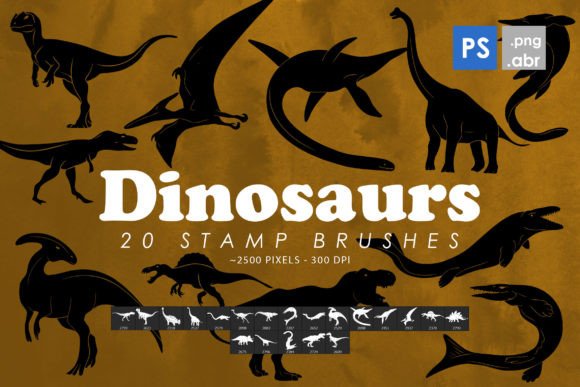
The core of this product is a set of 22 custom brush presets formatted for Adobe Photoshop. These are not simple shape stamps but are engineered to function as stamp brushes, allowing users to place detailed dinosaur illustrations onto their canvas with a single click. The package also includes 22 isolated PNG images, which provides flexibility for users who may prefer working with layers rather than brush dynamics.
Technically, the brushes are compatible with Photoshop CS6 through CC 2022 and beyond, ensuring broad accessibility for users with older software versions as well as those on the latest subscription models. The resolution of the brush tips ranges from 2000 to 2500 pixels. This high pixel count is a critical feature, as it ensures that the stamped images remain sharp and detailed even when scaled up for large-format prints or high-resolution digital displays.
Practical Applications and Use Cases
The versatility of Dinosaurs Photoshop Stamp Brushes makes them suitable for a wide array of creative endeavors. Because the assets are provided as both brushes and standalone PNGs, they can be adapted for multiple mediums:
- Print Design: The high resolution allows for use in posters, flyers, and educational materials without significant loss of quality.
- Web and Social Media: Designers can quickly incorporate thematic elements into blog headers, social media posts, or website banners.
- Merchandise and Apparel: The clear isolation of the subjects makes them ideal for t-shirt designs, stickers, and card layouts.
- Tattoo Concepts: Artists often use digital sketches as a base for tattoo designs. These detailed silhouettes can serve as a starting point for client consultations.
For educators or content creators focusing on paleontology, these brushes offer a quick way to illustrate articles, presentations, or children’s books without needing to commission custom illustrations for every project.
Benefits of Using Stamp Brushes
One of the primary advantages of using stamp brushes over manual drawing or searching for stock photos is efficiency. Creating realistic or stylized dinosaur illustrations from scratch requires significant time and artistic skill. With Dinosaurs Photoshop Stamp Brushes, the foundational artwork is already completed. This allows designers to focus on composition, color grading, and background integration rather than the intricacies of anatomical drawing.
Furthermore, the inclusion of PNG files adds a layer of non-destructive editing capability. While brushes are excellent for rapid placement, PNGs allow for individual layer manipulation, such as applying specific blending modes, filters, or transformations that might be more cumbersome with brush strokes. This dual-format approach caters to different workflow preferences, making the pack a practical addition to a designer’s arsenal.
Considerations and Tradeoffs
While the convenience is evident, there are tradeoffs to consider. First, the specificity of the theme means these brushes have a narrow application scope. If your work rarely involves prehistoric animals, nature themes, or fantasy creatures, the utility of this pack may be limited. It is a niche tool rather than a general-purpose asset library.
Secondly, while the resolution is high, stamp brushes are static. Unlike vector graphics, they cannot be scaled infinitely without potential pixelation if pushed beyond their native 2500-pixel limit. Designers working on massive billboards or extremely large format prints should test the limits of the resolution before committing to a final output. Additionally, because these are pre-made assets, there is a risk of encountering similar designs in other projects if the brush pack becomes widely popular. Customization is key to maintaining uniqueness.
Compatibility and Technical Requirements
Before purchasing or downloading, it is important to verify software compatibility. The pack is explicitly designed for Photoshop CS6 through CC. Users of alternative software such as GIMP, Krita, or Procreate may find that the ABR file format is not natively supported or requires conversion tools, which can sometimes result in loss of fidelity or functionality. For these users, the included PNG files are the more reliable component of the package, as PNG is a universal image format.
Additionally, users should ensure their system has sufficient memory to handle high-resolution brush tips. While modern computers generally manage this well, older hardware might experience slight lag when selecting or applying large brush stamps.
When to Choose This Pack vs. Alternatives
This collection is a strong fit for designers who need quick, high-quality dinosaur imagery for commercial or personal projects. It is particularly valuable for those who lack advanced illustration skills but need professional-looking results. If you are creating a series of educational materials, a themed party invitation, or a fantasy game interface, these brushes can save hours of work.
However, alternatives may be worth considering if you require full artistic control. Vector-based illustrations offer infinite scalability and easier color manipulation. If your project demands specific poses, angles, or species not included in the 22-brush set, you may need to commission custom artwork or use 3D modeling software. Additionally, if you are working exclusively in non-Adobe environments, a pure PNG or SVG library might be a more efficient investment than an ABR brush pack.
Making an Informed Decision
To determine if Dinosaurs Photoshop Stamp Brushes are right for you, evaluate your current project pipeline. Ask yourself how frequently you incorporate thematic illustrations into your work. If the answer is occasionally, and specifically involving prehistoric life, this pack offers a cost-effective and time-saving solution. The combination of brush presets and isolated PNGs provides enough flexibility to adapt to various design constraints.
Ultimately, the value lies in the balance between quality and convenience. With resolutions up to 2500 pixels and compatibility across a decade of Photoshop versions, this tool removes technical barriers for many users. However, it should be viewed as a supplementary asset rather than a replacement for fundamental design skills. By integrating these brushes thoughtfully—adjusting colors, adding textures, and combining them with other elements—you can create unique compositions that stand out despite the use of pre-made assets.
In conclusion, for professionals and enthusiasts looking to enhance their digital toolkit with specialized, high-resolution resources, this brush set represents a practical option. It simplifies the process of adding complex biological forms to designs, allowing creators to focus on the broader narrative and aesthetic of their work.